Transmission control board
Put this show machine on a Transmission control board, so an operator at the board can take a cuelist on air with one tap.
Transmission is a control board that runs in a browser. It shows every connected show machine's outputs on one rail and every available source as a tile, and tapping a source puts it on air. Moonshine publishes its SDI outputs to the board as rail rows and its cuelists as source tiles.
Connect this machine
An administrator does this once for every Moonshine server on the network. All the servers publish to the same board, and every project uses it.
- Open Settings → Cluster → Transmission.
- Turn on Connect every server to a Transmission board.
- In Host, enter the Transmission server's name or IP address, without
http://or a path. Enter its Port. - Under Board names, which appears once the switch is on, set the name the board should show for each server. If you leave a name empty, the board uses the server's name.
Changes apply when you press Enter or leave the field. The line under the fields shows the connection status:
| Line | Meaning |
|---|---|
| Not connecting — the bridge is switched off. | The switch is off |
| No status reported yet. | The show machine hasn't reported a connection status yet |
| Connected to host:port · 2 outputs · 4 sources | Connected, and what the board shows for this machine |
| Offline — reason | Trying to connect and failing, with the reason |
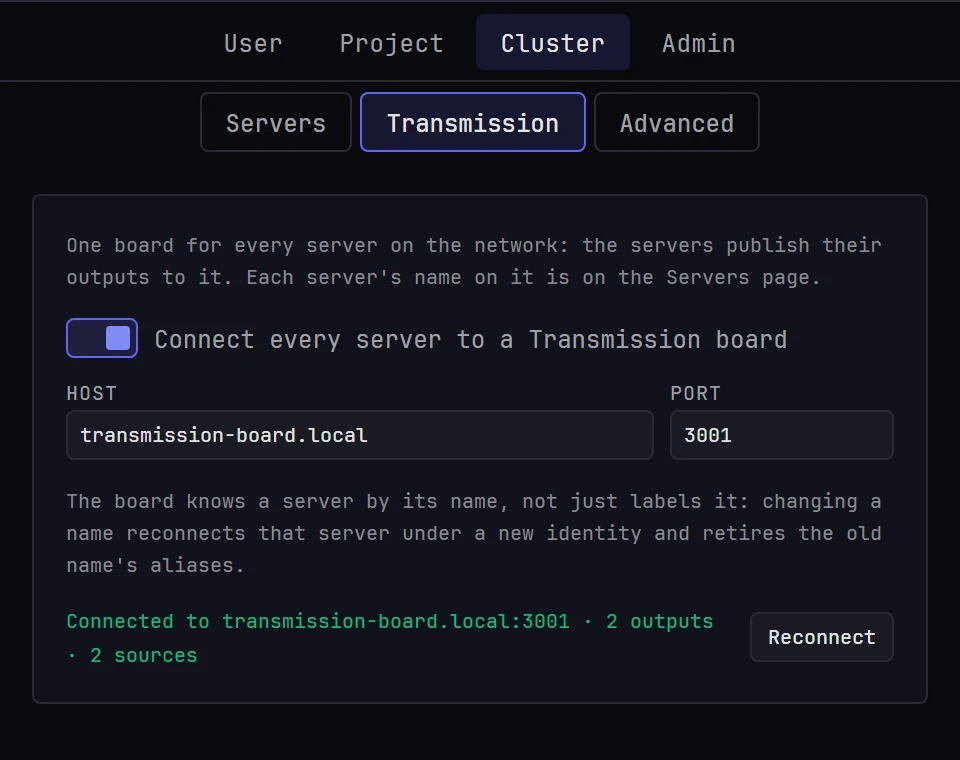
Moonshine retries the connection every few seconds. Reconnect closes the connection and opens a new one, which is useful right after you restart the Transmission server.
Only an administrator changes it
Anyone can open the page and see the status. The fields are disabled for everyone except administrators, and for an administrator while another one has a page of Settings → Cluster open. See Locks.
The show machine's own screen shows the same status on its Transmission: line. See The show machine's screen.
What the board shows
| On the board | From Moonshine |
|---|---|
| Header | This machine, under its board name |
| Output rail | One row for each projector whose output is SDI on a Blackmagic card, named after the projector |
| Source tiles | One tile for each cuelist, with the thumbnail of its first cue. The cuelist that's playing has the on-air ring |
Projectors with display or NDI outputs don't appear on the rail. Neither does an SDI output that's configured but not running, for example because its card was removed or the driver refused its signal format.
The board matches each row to its card by the channel number at the end of the device name, as in DeckLink 8K Pro (1). An SDI output whose device name has no number in brackets is left off the rail.
An empty cuelist appears as a disabled tile, because taking it would put black on every output.
Hover the tile that's on air to see it live, at about ten frames a second. Every other tile keeps its still thumbnail.
Taking a source
Tap a source tile to play that cuelist on this machine, exactly as if someone had pressed play in Moonshine. The on-air ring then follows what Moonshine reports, not the tap, so a take that fails doesn't leave a ring on the wrong tile.
There's no confirmation and no preview step: the board takes the source directly.
In a show across several servers, take on the leader's tiles. Every server appears on the board, but a follower plays only its leader's cues and refuses a take, and its ring stays where it was. See A show on several servers.
The board ignores Moonshine's own guards
A take from the board doesn't need a Moonshine sign-in and doesn't respect Moonshine's playback lock: the person at the board is treated as the operator. The board also doesn't check that a cuelist is wired to a surface, as Moonshine's own transport does. Wire every cuelist an operator might take before the show: see Transport controls.
Every Moonshine output carries the same show
Transmission treats each output on its rail as separately routable, and lets an operator lock an output so nobody re-routes it. Moonshine renders one show on every projector, so a source is the whole show:
- A take on any of this machine's rail rows plays that cuelist, and all of the machine's rows then show that source.
- Locking one of this machine's rows on the board doesn't stop a take on another of its rows from changing what the locked row shows.
So a lock on the board doesn't protect a Moonshine output. If nobody should change the show from the board, switch the connection off in Settings → Cluster → Transmission.
The board name is an identity
Transmission stores an operator's output aliases and locks under the board name. If you change a server's board name, under Board names in Settings → Cluster → Transmission, the server reconnects under the new name, and any aliases and locks set under the old name stay with the old name. Settle the name before anyone labels things on the board.
Two machines with the same board name keep pushing each other off the board. An empty board name falls back to the hostname, which another application on the same machine may also use. Give Moonshine its own board name so both stay on the board.
Source numbers never change
Each cuelist gets a permanent source number the first time it appears on the board, because the board attaches its aliases and locks to those numbers. Numbers are never reused, even after a cuelist is deleted, so a project that has had ten cuelists might show its current four as 7, 8, 9 and 10.
You can rename or reorder cuelists safely. Deleting one retires its number.
When the connection drops
The board keeps the last state it received and shows the connection as lost. Nothing changes at the venue: the board only sends commands and carries no video, so every output keeps showing what it was showing.
Where to go next
- Cuelists: build the cuelists the board shows as sources
- Outputs: set a projector's output to SDI
- The show machine's screen: the
Transmission:line